8 Glimpses into a Touchscreen Mac: What the Aspekt Touch Reveals
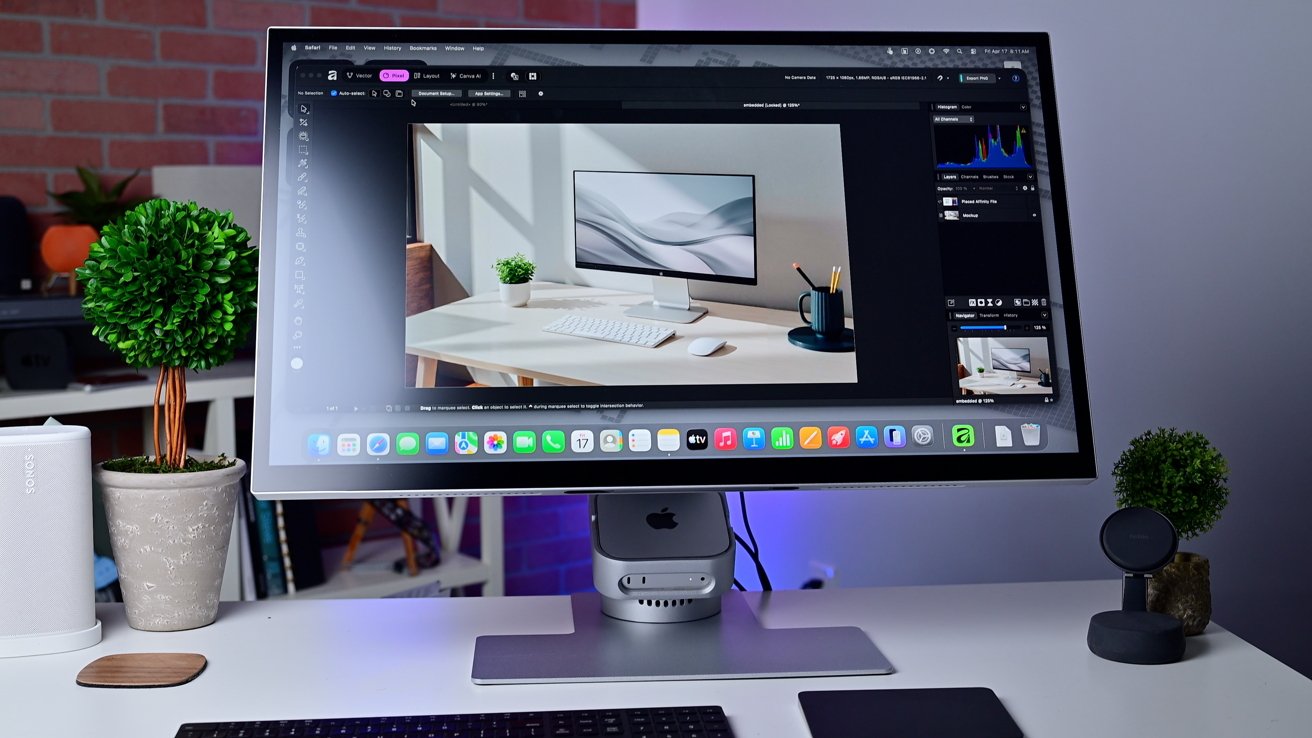
For years, the tech community has buzzed about Apple possibly adding native touch support to the Mac. While Cupertino remains quiet, third-party hardware like the Alogic Aspekt Touch monitor offers a tantalizing preview. I recently spent time with this 32-inch 4K display that tilts nearly flat and can house a Mac mini in its stand. Running macOS Tahoe, it provides an early, imperfect look at how a touchscreen Mac might work — and where it could stumble. Here are eight key takeaways from that experience.
1. A Massive, High-Resolution Canvas
The Aspekt Touch is a 32-inch 4K monitor, giving you plenty of screen real estate. When tilted down for touch interaction, that pixel-dense display becomes a spacious surface for direct manipulation. You can reach across the screen to tap, swipe, and drag with your fingers, something you wouldn't dare do on a smaller portable device. The 4K resolution keeps text crisp and images sharp, even up close. Compared to a typical desktop monitor, this feels like working on a giant iPad Pro — but with macOS underneath. The clarity is impressive, though you'll need to adjust your seating position to comfortably reach all corners.
2. The Tilt Mechanism Makes All the Difference
Alogic engineered the Aspekt Touch to tilt from a standard upright monitor angle down to nearly flat — about 10 degrees from horizontal. This is crucial because using a touchscreen that's vertical would be arm-straining and impractical. By tilting the display, you can use it like a drafting table or an oversized tablet. The stand feels sturdy, and the hinge is smooth, though it requires two hands to adjust. This tilt feature is what transforms a regular monitor into a true touch interface. Had it stayed upright, the touch capability would be largely wasted. For Apple, this suggests any native Mac touch solution would need a similar, high-quality tilt mechanism to be usable.
3. The Mac Mini Integration: All-in-One Sleight of Hand
One clever design choice is the built-in housing for a Mac mini in the base of the stand. You can insert a compact Mac, plug it in, and have a complete all-in-one touchscreen computer without external boxes. This mirrors how an iMac works but with the flexibility of upgrading the Mac separately. The stand houses the mini securely and keeps cables tidy. While this isn't something Apple would copy directly (they prefer thinner designs), it shows how a touchscreen Mac could be modular. It also suggests that Apple might need to rethink the Mac's internal layout to support a touch interface without excessive bulk.
4. macOS Tahoe: Built for Clicks, Not Fingers
Running macOS Tahoe (still a point-release of Sequoia), the Aspekt Touch exposes the operating system's fundamental click-centric design. Icons are small, menus are precise, and many interactions assume a mouse pointer. On a touchscreen, you have to tap precisely, and sometimes the system registers a scroll when you intend to click. Apple's interface elements like the close button (the red dot) become tiny targets. Multi-finger gestures, like two-finger scroll, work but feel inconsistent. The operating system is not touch-optimized; it's merely touch-*compatible*. This underscores the massive software overhaul Apple would need for a native solution — perhaps with larger touch targets, gesture shortcuts, and a more finger-friendly layout.
5. Ergonomics: A Work in Progress
Using a touchscreen desktop requires you to reach forward constantly, which can lead to fatigue. The tilt helps, but you still have to lean in. With the Aspekt Touch, I found myself alternating between traditional mouse-and-keyboard mode and touch mode. The monitor's stand allows both, but the transition isn't seamless. For prolonged touch use, your arm gets tired — it's heavier than lifting a finger. Apple would need to consider ergonomic solutions, such as a better stand with more adjustability, or perhaps an optional supportive arm. The monitor also gets warm after extended touch use, though not uncomfortably so.

6. Gestures Are the Key to Productivity
Where touch excels is in gestures — pinch to zoom, swipe to navigate, two-finger tap for right-click. The Aspekt Touch's 10-point multitouch supports these nicely. For creative work like photo editing, being able to pinch-zoom directly on the image is intuitive. Scrolling through long web pages feels natural, and dragging files between folders becomes tactile. However, macOS doesn't utilize gestures as deeply as iPadOS. For instance, there's no equivalent of the iPad's four-finger swipe to switch apps. If Apple ever makes a touchscreen Mac, they would likely borrow more from iPad gesture language, blending the two experiences. The Aspekt Touch shows promise but leaves you wanting more native gesture support.
7. The “Better and Worse” Reality
As the original article hinted, using a touchscreen Mac is a mixed bag. On the plus side, direct interaction feels immediate and satisfying for certain tasks — like selecting a tiny menu item or tapping a button during a video call. It's great for casual browsing or when you need to quickly point at something. On the downside, precision work suffers. Selecting text is frustrating; the cursor jumps. Dragging items across the screen requires constant resets of your finger position. The monitor's touch surface also collects fingerprints, which can be distracting on a 4K display. The experience is better than nothing, but far from polished. It clearly demonstrates why Apple has been cautious.
8. A Peek Into a Possible Hybrid Future
The Aspekt Touch isn't the first touchscreen monitor from Alogic, but it's the most integrated with macOS. It represents a vision where the line between Mac and iPad blurs. Could Apple's future include a Mac with a touchscreen — perhaps a model that folds or detaches? This monitor suggests the hardware is ready: we have large, responsive displays and powerful compact Macs. The bottleneck is software. Apple would need to create a touch-friendly layer within macOS, maybe even a full touch mode that activates when the screen tilts. The Aspekt Touch gives us a plausible, if imperfect, glimpse of that future. It's a compelling proof of concept that raises more questions than answers.
In summary, the Alogic Aspekt Touch monitor serves as an intriguing early prototype for a touchscreen Mac. It shows the physical feasibility and the ergonomic challenges, while highlighting the software gap that Apple would need to bridge. If Cupertino ever decides to add touch to the Mac, they'll have lessons to learn from this third-party experiment — both the triumphs and the pitfalls.